

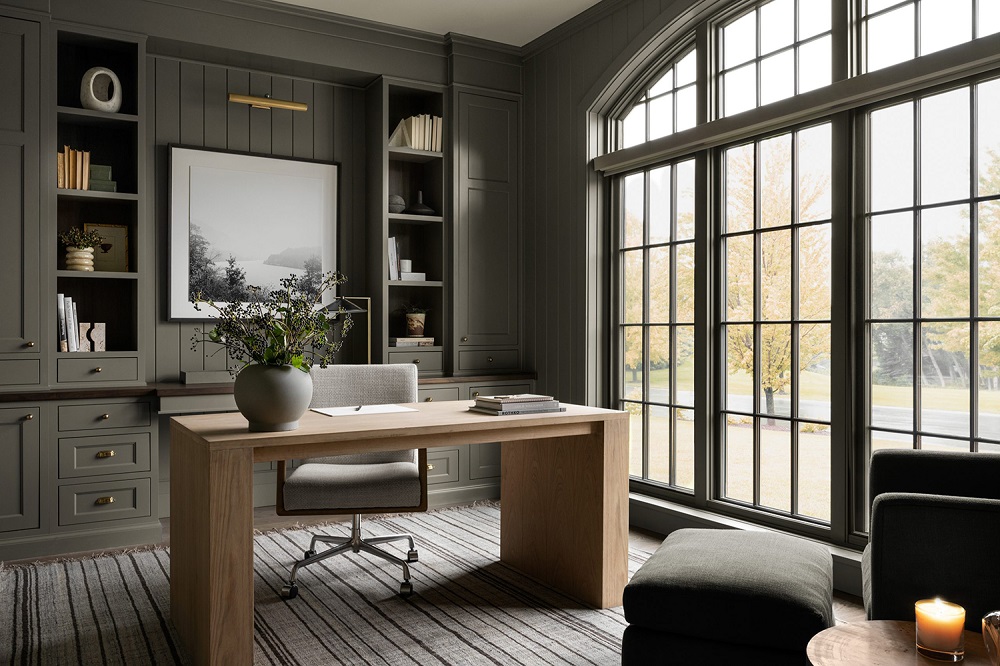
Working from home can feel empowering—or distracting—depending largely on how your workspace is designed. A thoughtfully planned home office improves focus, efficiency, comfort, and motivation, turning everyday tasks into smoother, more satisfying experiences. Whether your workspace is a full room or a small corner, the right design choices can dramatically increase productivity.
This guide explains practical interior design strategies that help you create a workspace that supports deep work and reduces fatigue.
Why Home Office Design Matters for Productivity
Your environment directly influences your concentration, mood, and workflow. A cluttered or uncomfortable workspace increases stress and reduces attention span, while a structured and inspiring setup encourages consistency and better output.
An effective home office:
- Minimizes distractions
- Improvs posture and comfort
- Supports mental clarity
- Encourages time discipline
- Boosts creativity and engagement
Design is not about decoration alone—it’s about creating a system that works with your brain instead of against it.
Choose the Right Location First
Before selecting furniture or décor, identify the best place for your workspace.
Ideally, your home office should:
- Be away from high-traffic household areas
- Receive natural light
- Offer sufficient ventilation
- Allow door closure (if possible)
- Support a stable internet connection
If a separate room isn’t available, define your workspace visually using a rug, divider, or shelving unit. Even small spatial boundaries help the brain switch into “work mode.”
Prioritize Ergonomic Furniture
Comfort directly affects productivity. Poor posture leads to fatigue, headaches, and reduced efficiency over time.
Focus on these essentials:
Ergonomic chair
Choose one with:
- Lumbar support
- Adjustable height
- Breathable material
- Armrest positioning
Functional desk
Your desk should:
- Match elbow height
- Provide enough surface area
- Support cable management
- Keep essentials within reach
An ergonomic setup prevents physical strain and supports longer focused sessions without discomfort.
Optimize Natural Lighting
Lighting affects both mood and alertness.
Natural light:
- Reduces eye strain
- Improvs sleep cycles
- Enhances concentration
- Elevates emotional wellbeing
Place your desk perpendicular to a window if possible. Avoid positioning screens directly facing strong sunlight to reduce glare.
If natural light is limited, combine:
- Overhead ambient lighting
- Task lighting
- Warm accent lighting
Balanced illumination supports steady productivity throughout the day.
Use Color Psychology Strategically
Colors influence mental performance more than most people realize.
Consider these productivity-friendly shades:
- Soft blues for calm focus
- Muted greens for balance and eye comfort
- Warm neutrals for stability
- Light greys for modern clarity
Avoid overly dark tones or intense reds across large surfaces, as they may increase visual fatigue.
A calm palette helps maintain attention without overstimulation.
Keep Your Workspace Clutter-Free
Clutter competes for your brain’s attention.
Create a simple organization system:
- Use drawer dividers
- Install floating shelves
- Add vertical storage
- Hide cables neatly
- Keep only daily essentials visible
A tidy desk encourages mental clarity and faster task switching.
Add Productivity-Boosting Accessories
Accessories should serve function—not just appearance.
Helpful additions include:
- Desk organizers
- Whiteboards or planners
- Cable trays
- Laptop stands
- Noise-reducing panels
Plants are especially effective. Indoor greenery improves air quality and reduces stress levels while making the workspace feel alive.
Control Noise and Distractions
Noise interruptions reduce workflow efficiency significantly.
To manage sound distractions:
- Use rugs and curtains to absorb echo
- Install soft wall panels
- Position desk away from doors
- Use noise-canceling headphones if necessary
Even small acoustic improvements increase concentration depth.
Personalize Without Overcrowding
A workspace should feel motivating—but not overwhelming.
Add meaningful personal touches like:
- A framed quote
- Artwork
- A vision board
- Minimal travel souvenirs
- A favorite notebook
These elements create emotional connection without visual overload.
Balanced personalization encourages consistency in daily routines.
Improve Airflow and Temperature Comfort
Poor air quality affects alertness more than expected.
Ensure your workspace has:
- Cross ventilation
- A fan or air purifier if needed
- Comfortable temperature control
- Access to fresh air breaks
A well-ventilated workspace supports sustained energy levels throughout the day.
Separate Work and Relaxation Zones
One common productivity challenge in home offices is blurred boundaries between work and personal life.
You can improve separation by:
- Using different lighting tones
- Changing chair position after work
- Closing laptop storage drawers
- Covering your desk at the end of the day
These small rituals help signal the brain that work time has ended.
Clear boundaries improve both performance and rest quality.
Frequently Asked Questions (FAQs)
1. What is the ideal desk direction for productivity at home?
Facing a wall with minimal distractions or positioning sideways to a window often supports better concentration than facing open household activity areas.
2. How big should a home office desk be?
A desk between 100–140 cm in width typically provides enough space for a laptop, documents, and essential accessories without feeling crowded.
3. Are standing desks better than traditional desks?
Standing desks can reduce sedentary fatigue and improve circulation, especially when alternated with seated work periods.
4. How can I stay productive in a small home office?
Use vertical storage, foldable desks, wall shelves, and minimal décor to maximize usable space without visual clutter.
5. Which indoor plants are best for a home office?
Low-maintenance options like snake plants, pothos, and peace lilies improve air freshness and require minimal care.
6. What lighting color temperature is best for focus?
Neutral white lighting between 4000K–5000K supports alertness and reduces eye strain during long work sessions.
7. How often should I reorganize my home workspace?
A quick weekly reset and a deeper monthly reorganization keep your workspace efficient and distraction-free.